
A consistent naming convention can be a game-changer for keeping your code organized and easy to navigate. Here are four tips for implementing a naming convention in your WordPress development:
The name with no spaces and the file type at the end.
Our goal is to give each code block a name that reflects both the system it operates on and the features it modifies. When naming files, it’s important to avoid using spaces as modern systems may not accept them during export or imports. Instead, use underscores or camel case to separate words. We recommend beginning the name with the system that the code block is intended for, followed by a description of the feature, block, or child item that the code block manipulates. Additionally, adding the file type at the end (such as .css, .scss, .php, or .js) can make it easier to identify at a glance.
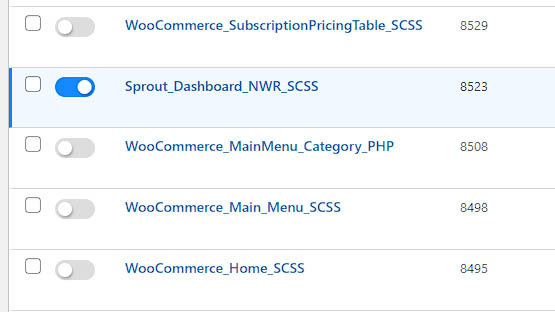
System_FeatureOrBlockOrPage_FILETYPE
A short description of what the file is for.
As your codebase grows, you may have multiple files with similar names. To avoid confusion, give each file a clear and concise description of its purpose, either in the Scripts Organizer plugin or within the code block itself. For example, consider using “Sprout frontend – customer dashboard layout.”

Description using Scripts Organizer plugin overview.
Add or create tag filters.
Creating tags for your files can make it much easier to find what you need. If you have hundreds of files, this can be an invaluable tool. Consider grouping file tags by their function, system, and type.

Tags inside the code block via Scripts Organizer plugin.
Table of contents.
Finally, add a table of contents to your code file. This can help you quickly jump to the classes you need, especially if you’re working with a long and complex code. Group similar classes together and give them a name with comment tags. Create a table of contents at top of your file, listing all of your class names so you can easily jump to those class groups with CTRL + F.
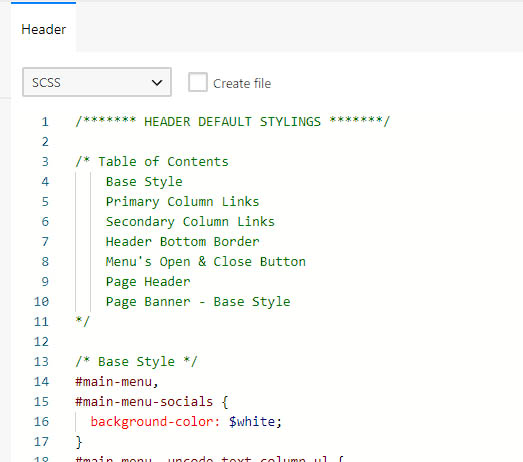
A Table of Contents will save time when finding overrides.
By implementing a naming convention and other organizational tools, you can make your WordPress development process smoother and more efficient. Happy coding!


